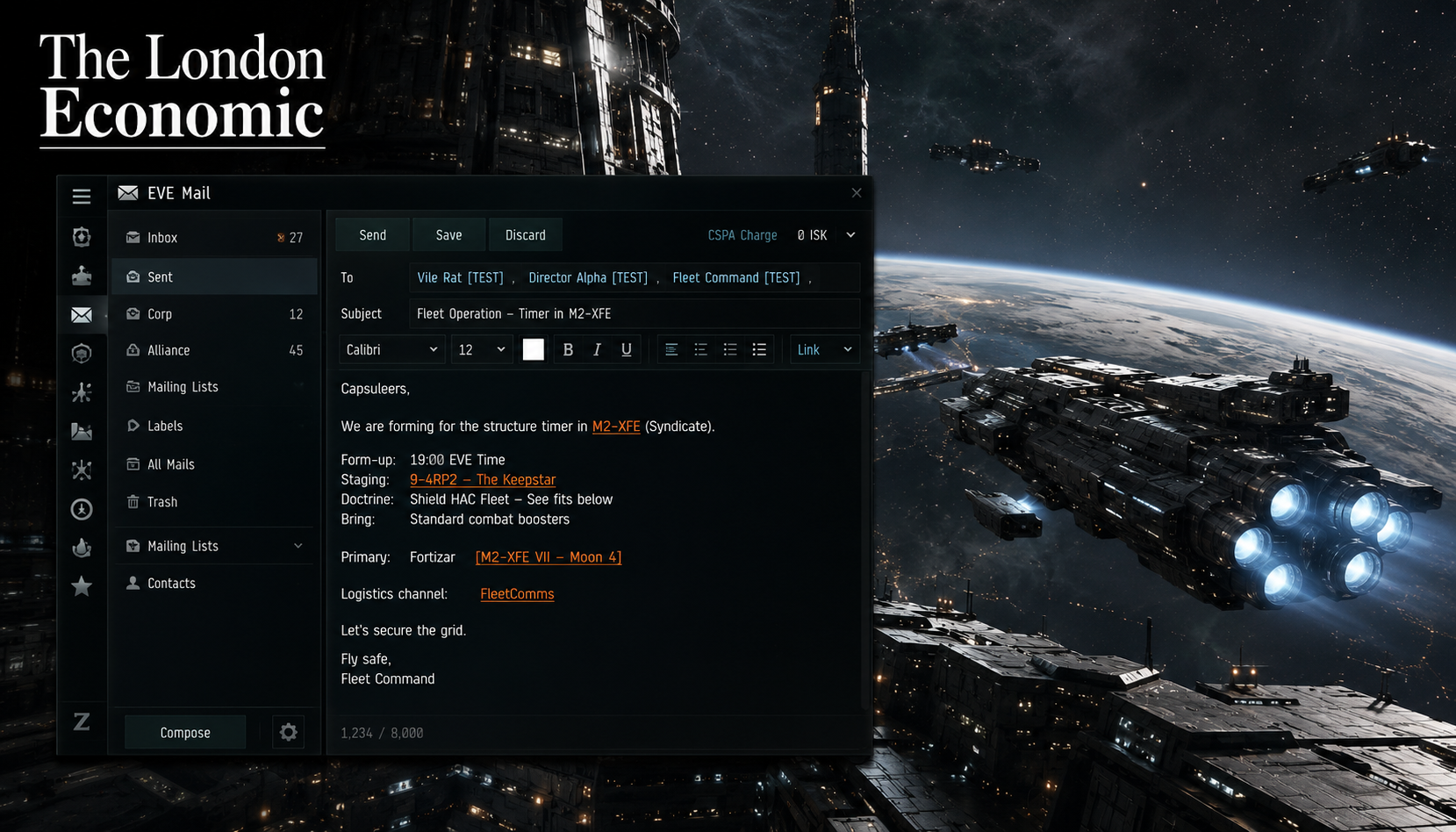
EVE Mail
EVE Mail Guide: Everything EVE Online Players Need to Know
EVE Mail is the built-in messaging system at the core of EVE Online, the long-running science fiction MMORPG developed by CCP Games. It works much like a conventional email client, yet it operates inside one of the most complex and consequential player-driven universes in gaming history. Whether you are a fresh pilot reaching out to a corporation recruiter or an alliance leader coordinating thousands of capsuleers across hundreds of star systems, understanding EVE Mail is one of the most practical skills you can develop.
EVE Mail is a tool accessible through the Neocom, EVE Online’s main interface panel. Pilots can send and receive messages to and from other pilots, and certain automated game events also deliver mail to your inbox, such as insurance payouts following the loss of a ship or alerts about a player-owned starbase that requires refuelling. EVE University
In a game where player interaction drives everything from market economics to galactic warfare, the ability to communicate clearly and efficiently is not a minor feature. It is a strategic necessity.
What Is EVE Mail and How Does It Work?
To compose a new EVE Mail, pilots click the button directly below the EVE Mail tab in the Neocom. From the composition window, you can select recipients, add a subject line, apply labels, and use basic formatting tools including font size changes and colour.
An EVE Mail may be up to 8,000 characters in length. Text formatting such as colour changes consists of additional HTML characters and will reduce this limit further, so heavily formatted mails may not accommodate the full character count.
When a mail is selected, you can use Forward, Reply, and Reply All buttons to copy and respond to messages quickly. Multiple recipients can be separated with a comma, and you can also specify mailing lists alongside individual recipients. EVE University
One particularly powerful feature is auto-linking. Auto-linking allows user-typed text to be converted into a clickable link pointing to a character, corporation, solar system, constellation, region, station, item, or chat channel. Items can also be linked via drag and drop, and any text highlighted in orange within communications indicates an active link.
This makes EVE Mail far more useful than a simple text inbox. Pilots can embed entire operational briefings complete with clickable waypoints, ship fittings, and station destinations, all within a single message.
How to Send Your First EVE Mail: Step-by-Step
For new pilots, sending your first EVE Mail takes only a few seconds once you know where to look. Here is how to do it:
- Open the Neocom panel on the left side of your screen.
- Click the EVE Mail icon to open your mail window.
- Click the Compose button directly below the EVE Mail tab.
- Enter the recipient’s name in the To field. Separate multiple recipients with a comma.
- Add a clear Subject line so your recipient understands the topic immediately.
- Write your message in the body field. You can apply basic formatting using the toolbar.
- Use auto-link to embed references to ships, systems, or stations by typing the name and allowing the game to detect it.
- Click Send when you are ready.
That is all it takes. The message will appear in your recipient’s inbox whether they are online or not, making EVE Mail an asynchronous tool ideal for planning, diplomacy, and coordination across different time zones.
Understanding the CSPA Charge: EVE’s Anti-Spam System
One of the first things that confuses new pilots is the CSPA charge. It sounds like bureaucratic jargon, but it plays a meaningful role in how communication flows across New Eden.
A CSPA charge is an amount of ISK which can be levied on communications such as conversations and mail, acting as a deterrent to spam. CSPA is managed via the EVE Mail settings. As of the Scylla expansion, the charge defaults to zero ISK for new pilots. The current maximum charge is one million ISK, though CCP can set custom amounts for specific actions such as sending corp mails in NPC corporations. Only non-blocked characters in your contact list or those in your corporation can message you without a fee.
In practice, this means that if you set your CSPA charge to one million ISK, any pilot who is not already in your contacts or your corporation will be required to pay that fee before their message reaches you. For players engaged in active recruitment or inter-alliance diplomacy, a high CSPA charge creates an invisible barrier that blocks people you actually want to hear from.
Many groups, including the EVE University Incursion Community, require their members to disable the CSPA charge entirely to prevent unnecessary ISK expenditure during coordinated activities.
The safest approach for most active players is to keep your CSPA charge at zero and manage unwanted contacts through the block function instead.
EVE Mail Mailing Lists: How to Communicate at Scale
Individual messages serve their purpose, but EVE Online’s most powerful communication happens at the group level. Mailing lists make this possible.
Mailing lists are a way of sending in-game mails to a select group of people. Pilots can join mailing lists in subjects that interest them by opening the mail window and selecting mailing lists in the bottom left.
Corporation and alliance leaders use mailing lists to push out fleet operation notices, recruitment announcements, war declarations, standings updates, and strategic briefings. In a game where thousands of players can belong to a single alliance spread across dozens of time zones, mailing lists are the closest equivalent to a corporate broadcast system.
Corporation and Alliance Bulletin Boards
Mails sent to a whole corporation or alliance are labelled accordingly and appear in the appropriate label view, making it straightforward for members to filter and find organisation-level communications alongside their personal mail.
A Common Mistake to Avoid
One persistent problem with mailing lists is the accidental Reply All. New members frequently reply to a corporation-wide mail without realising their response goes back out to the entire membership. In a corporation with hundreds of pilots, this creates inbox clutter quickly. Always check whether you are replying to the sender or to the full list before clicking send.
Under EVE University’s rules, members should not create official mailing lists independently, to avoid the organisation losing control of them when that member leaves. Any new mailing lists should be created by the CEO. This is a sensible governance principle that any well-run corporation should adopt.
Why EVE Mail Matters: Communication as a Competitive Advantage
EVE Online, first released in May 2003, is one of the longest-running and most intricate MMORPGs ever built. Players can participate in a wide range of professions including mining, piracy, manufacturing, trading, exploration, and both player versus environment and player versus player combat. The game contains over 7,800 star systems and is widely recognised for the scale and complexity of its player interactions.
About the Author